Bg Eraser
Bg Eraser instantly removes backgrounds from up to 20 images at once, delivering clean transparent PNGs with no signup and automatic privacy.
Visit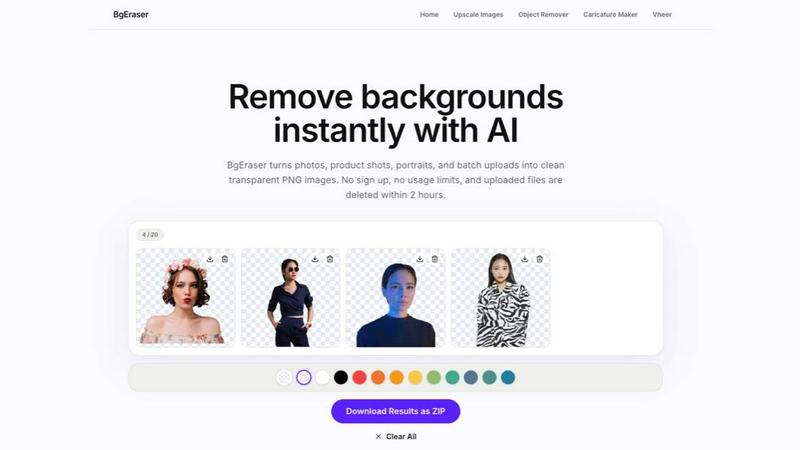
Bg Eraser is a powerful and user-friendly online tool designed to remove backgrounds from images quickly and efficiently. Leveraging advanced AI technology, it automates the tedious process of background removal, delivering clean, high-quality transparent PNG files in seconds. The tool is built for a wide range of users, including e-commerce sellers, graphic designers, photographers, and content creators who need to streamline their image editing workflows. A standout feature is its ability to process up to 20 images simultaneously, allowing users to launch products faster by preparing clean catalog assets, marketplace listings, and launch visuals without repeating the same edit one file at a time. Bg Eraser operates entirely in the browser with no registration or software installation required, making it accessible from any device. It supports common image formats like JPG, PNG, and WebP, and offers a simple drag-and-drop interface for uploading files. Privacy is a core focus; all uploaded images and generated results are automatically deleted within two hours, reducing long-term file storage and protecting user data. For users who need more than just background removal, the platform also offers additional tools like an image upscaler, object remover, and caricature maker, all accessible from the same website. Whether you need images for websites, online stores, social media, marketing materials, or design mockups, Bg Eraser provides a fast, convenient, and privacy-friendly solution that simplifies everyday production tasks.
Features of Bg Eraser
AI Background Eraser
The core feature uses advanced AI to automatically detect and separate the subject of an image from its background. It analyzes complex edges, including hair, fur, and intricate product outlines, to preserve the subject with clean, sharp edges. This eliminates the need for manual masking or complex selection tools, allowing users to achieve professional results with a single click.
Batch Background Removal
This feature enables users to upload up to 20 JPG, PNG, or WebP files at once and remove their backgrounds in a single workspace. Instead of editing each image one by one, the AI processes the entire batch simultaneously. This is ideal for e-commerce sellers preparing multiple product photos, photographers editing a series of portraits, or anyone needing to process large volumes of images efficiently.
Transparent PNG Output
After background removal, Bg Eraser delivers high-quality transparent PNG files. This output format is essential for e-commerce listings, design mockups, profile pictures, presentations, and social media posts where the image needs to blend seamlessly into different backgrounds. The transparency is preserved with high fidelity, ensuring the subject looks natural when placed on any new background.
Replace Background Color
Users have the option to keep the transparency or apply a solid background color directly within the tool before downloading. This feature provides additional flexibility for creating consistent product shots, branded visuals, or simple graphics without needing to open a separate editing application. The color replacement is applied instantly to the processed image.
Free with No Sign-Up
Bg Eraser is completely free to use with no account creation or subscription required. Users can access the full background removal functionality directly in their browser without any upfront costs, usage limits, or hidden fees. This makes it an accessible solution for anyone, from individual creators to small business teams.
Privacy-Friendly Cleanup
All uploaded images and generated results are automatically deleted from the server within two hours. This automated cleanup process reduces long-term file storage and ensures user privacy. No personal data is retained, and users can use the service with confidence that their images will not be stored or accessed after processing.
Use Cases of Bg Eraser
E-commerce Product Photography
E-commerce sellers can use Bg Eraser to quickly prepare product photos for online marketplaces like Amazon, eBay, or Etsy. By removing cluttered or inconsistent backgrounds, sellers can create a uniform and professional look for their entire catalog. The batch processing feature allows them to upload multiple product shots at once, significantly speeding up the listing creation process and ensuring all images meet marketplace requirements.
Social Media Content Creation
Content creators and social media managers can use the tool to create engaging visuals for posts, stories, and profile pictures. Removing backgrounds from portraits, event photos, or promotional graphics allows them to overlay subjects onto branded backgrounds, templates, or creative compositions. The transparent PNG output ensures the final images look polished and professional across different social media platforms.
Graphic Design Mockups
Designers can streamline their workflow by using Bg Eraser to prepare source images for mockups, presentations, and client projects. Instead of manually cutting out subjects in complex design software, they can quickly generate clean transparent PNGs. This saves time when creating product mockups, website layouts, brochure designs, or any visual asset where the subject needs to be placed on a custom background.
Profile and Identity Photos
Individuals can use Bg Eraser to create professional-looking profile pictures for LinkedIn, company websites, or business directories. By removing a distracting background from a selfie or portrait, they can replace it with a solid color or leave it transparent for use on different platforms. The AI handles complex details like hair and glasses, ensuring the final image looks natural and polished.
Frequently Asked Questions
What is Bg Eraser?
Bg Eraser is an online AI-powered tool that automatically removes backgrounds from images. It supports batch processing of up to 20 images at once, outputs transparent PNG files, and requires no registration or software installation. It is designed for e-commerce, design, social media, and personal use.
Can I remove backgrounds from multiple images at once?
Yes, Bg Eraser supports batch background removal. You can upload up to 20 JPG, PNG, or WebP files simultaneously, and the AI will process all of them in the same workspace. This saves significant time compared to editing each image individually.
What image formats does Bg Eraser support?
Bg Eraser supports JPG, PNG, and WebP image formats. Users can upload files in these formats for background removal, and the processed results are downloaded as transparent PNG files.
Do I need to create an account?
No, Bg Eraser is completely free and requires no account creation or sign-up. You can use the tool directly in your browser without any registration, subscriptions, or hidden fees.
How does Bg Eraser protect my privacy?
All uploaded images and generated results are automatically deleted from the server within two hours. This automated cleanup process ensures your files are not stored long-term, protecting your privacy and reducing data retention.
What kinds of images work best?
Bg Eraser works best with images that have a clear subject and a distinct background, such as product photos, portraits, logos, pets, and apparel. The AI is designed to handle complex edges like hair and fur, but results may vary with very intricate or low-contrast backgrounds.
How accurate is Bg Eraser on complex backgrounds?
The AI is highly accurate on most backgrounds, including those with intricate details. It is designed to separate subjects with clean edges, even with complex elements like hair, glasses, or product packaging. For the best results, ensure the subject is well-lit and clearly visible against the background.
Can I replace the background after removing it?
Yes, after removing the background, you have the option to either keep the transparency or apply a solid background color of your choice before downloading the image. This feature is available directly within the tool.
Are processed images free for commercial use?
Yes, images processed with Bg Eraser are free for commercial use. There are no restrictions on how you use the resulting transparent PNG files, whether for e-commerce listings, marketing materials, or any other commercial application.
You may also like:

Product Launch Checklist
A free launch checklist for SaaS, apps, AI tools and more. Every step says why it matters and when you can skip it.

Wisegrid
Wisegrid is a spreadsheet-native work management platform for project-driven teams

Luffy
Luffy is an AI employee in Slack that remembers your workspace and executes tasks across every app
Boost Your Growth
Submit your SaaS to 140+ directories and SaaS submission sites. We handle every listing so you can focus on building your product.