Caption.IM
Caption.im transforms audio into real-time captions, translations, and summaries on your Mac, enhancing productivity and accessibility.
Visit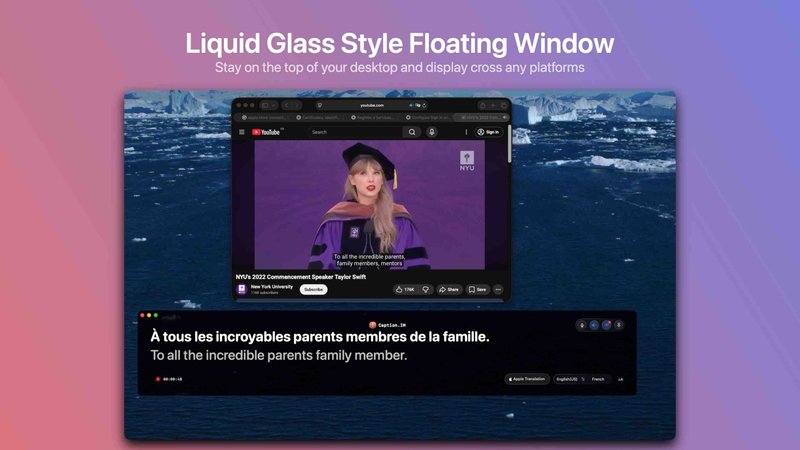
Caption.im is a cutting-edge AI captioning assistant specifically designed for macOS users. This privacy-first application transforms any audio captured on your Mac into real-time captions, instant translations, and structured meeting notes, all processed locally on your device. By integrating seamlessly with system audio, Caption.im works across a variety of applications, including video conferencing tools like Zoom, Google Meet, and Microsoft Teams, as well as streaming platforms such as YouTube and educational tools. Its unique value proposition lies in its ability to enhance communication accessibility and productivity without relying on third-party services or compromising user privacy. Ideal for professionals, students, and content creators, Caption.im empowers users to capture, translate, and summarize information on the fly, transforming conversations into clear, actionable insights.
Features of Caption.IM
Real-time transcription
Caption.im offers real-time transcription capabilities, allowing you to generate live captions during meetings, webinars, and video calls. This feature enhances understanding and engagement, ensuring that everyone can follow along regardless of their hearing ability.
Instant translation
With its instant translation feature, Caption.im enables users to understand multilingual content through real-time translated subtitles. This is particularly beneficial for global teams and individuals who frequently engage with foreign-language media or conversations.
Floating subtitle window
The elegant floating subtitle window provides a transparent overlay that integrates smoothly with macOS. This feature allows users to view captions without obstructing their screen, ensuring a seamless experience during meetings or while watching videos.
AI meeting summaries
Automatically generate structured summaries and key insights after discussions with Caption.im's AI meeting summaries feature. This functionality saves time by compiling essential points, action items, and highlights from longer conversations, making it easier to review and follow up.
Use Cases of Caption.IM
Remote meetings
In remote meetings, Caption.im enhances communication by providing live captions and summaries, helping participants stay engaged and informed. This is particularly helpful in diverse teams where language barriers may exist.
Online learning
Caption.im is a perfect tool for online learners, offering real-time captions for lectures, webinars, and tutorials. Students can focus on the content while simultaneously accessing translations and summaries for better comprehension.
Multilingual teams
For teams working across different languages, Caption.im facilitates effective collaboration by providing instant translations during discussions. This feature ensures that all team members can contribute and understand the conversation fully.
Content creators
Content creators can utilize Caption.im to generate captions for their videos, podcasts, and livestreams seamlessly. By transforming spoken content into text instantly, they can improve accessibility and reach a wider audience.
Frequently Asked Questions
What platforms does Caption.IM support?
Caption.im supports a wide range of platforms by capturing system audio directly. You can use it with Zoom, Google Meet, Microsoft Teams, YouTube, podcasts, and more.
Is Caption.IM privacy-focused?
Yes, Caption.im is built with privacy in mind. All processing and speech recognition occur locally on your device, ensuring that your conversations remain private and secure.
Do I need an internet connection to use Caption.IM?
No, Caption.im operates locally on your Mac, meaning you do not require an internet connection to generate captions, translations, or summaries.
Is Caption.IM compatible with Apple Silicon?
Yes, Caption.im is optimized for Apple Silicon (M1, M2, M3, and later), delivering fast and efficient performance with minimal latency, making it suitable for all Mac users.
You may also like:

Product Launch Checklist
A free launch checklist for SaaS, apps, AI tools and more. Every step says why it matters and when you can skip it.

Wisegrid
Wisegrid is a spreadsheet-native work management platform for project-driven teams

Luffy
Luffy is an AI employee in Slack that remembers your workspace and executes tasks across every app
Boost Your Growth
Submit your SaaS to 140+ directories and SaaS submission sites. We handle every listing so you can focus on building your product.