ProcessBankStatement
Instantly convert PDF bank statements into clean, structured CSVs with fast, secure data extraction for finance professionals.
Visit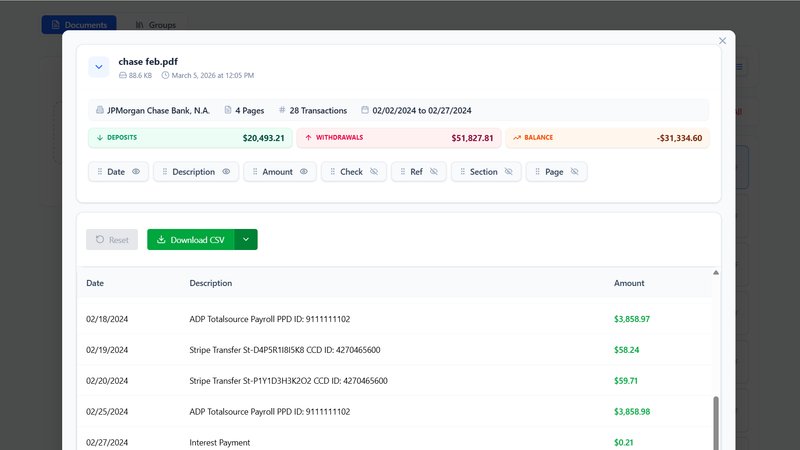
ProcessBankStatement is a cutting-edge tool designed to revolutionize the way individuals and businesses handle bank statement data. It enables users to effortlessly convert any PDF bank statement into a structured CSV file in mere seconds, eliminating the tedious and error-prone task of manual data entry. This tool is ideal for accountants, financial consultants, small business owners, and anyone who regularly processes bank statements. With robust support for major U.S. banks like Chase, Bank of America, and Wells Fargo, it ensures accuracy and reliability in data extraction. The main value proposition lies in its speed, security, and user control, allowing users to maintain privacy while streamlining their financial processes. By choosing ProcessBankStatement, users gain a powerful ally in managing their financial data efficiently and effectively.
Features of ProcessBankStatement
Fast and Effortless Data Conversion
ProcessBankStatement allows users to upload PDF bank statements with ease, requiring no special formatting. In just seconds, users receive clean and structured CSV files, making the process incredibly efficient and hassle-free.
Secure and Private Data Handling
User data security is paramount with ProcessBankStatement. All files are encrypted during transit, ensuring that sensitive information is protected. Users have complete control over their files, including the ability to delete them at any time.
Precise Formatting for Quick Integration
The smart parser embedded within ProcessBankStatement meticulously extracts data from bank statements, ensuring that the output is cleanly formatted and ready for immediate use in applications like QuickBooks and Excel. This feature minimizes the need for additional data cleanup.
Support for Multiple Formats and Batch Uploads
ProcessBankStatement supports a variety of PDF formats, including both text-based and scanned documents. Additionally, users can take advantage of batch uploads to process multiple statements simultaneously, significantly enhancing productivity.
Use Cases of ProcessBankStatement
Accounting and Bookkeeping
Accountants and bookkeepers can utilize ProcessBankStatement to quickly convert client bank statements into structured data. This efficiency allows them to focus on more strategic tasks rather than getting bogged down by manual data entry.
Financial Analysis
Financial analysts can leverage the tool to transform bank statements into CSV files for detailed analysis. This enables them to assess financial health and identify trends without the hassle of formatting issues.
Small Business Management
Small business owners can streamline their financial management by using ProcessBankStatement to convert their bank statements. This helps them maintain accurate records and simplifies tax preparation, ultimately saving time and reducing stress.
Loan Processing
Mortgage processors can benefit from the quick turnaround time provided by ProcessBankStatement. By converting bank statements efficiently, they can expedite the loan approval process, making it easier to serve clients promptly.
Frequently Asked Questions
What file types are supported?
Currently, ProcessBankStatement supports PDF bank statements, including both text-based and scanned files, allowing for versatile usage across various banking formats.
Can I upload scanned images or photos?
Yes, users can upload scanned PDFs and image-based statements. The tool is designed to handle various file types effectively, ensuring accurate data extraction.
Is there a free trial available?
Yes, guests can access a free trial that allows for 3 pages per day. Registered users receive an even better offer with 5 pages per day at no cost, making it easy to test the service.
How secure is my data?
Data security is a top priority at ProcessBankStatement. All files are encrypted during transmission, and users retain complete control over their data, including the ability to delete files whenever they choose.
You may also like:

Trading Risk Lab
Trading Risk Lab streamlines risk management with powerful calculators for position sizing, drawdown analysis, and trade planning.

VolRadar
VolRadar scans 500+ S&P stocks overnight to rank the best options premium-selling setups with computed strikes.
Boost Your Growth
Submit your SaaS to 140+ directories and SaaS submission sites. We handle every listing so you can focus on building your product.