Timo Desk
TimoDesk automates time tracking, screenshots, and activity monitoring to transform chaotic workflows into clear, data-driven productivity insights.
Visit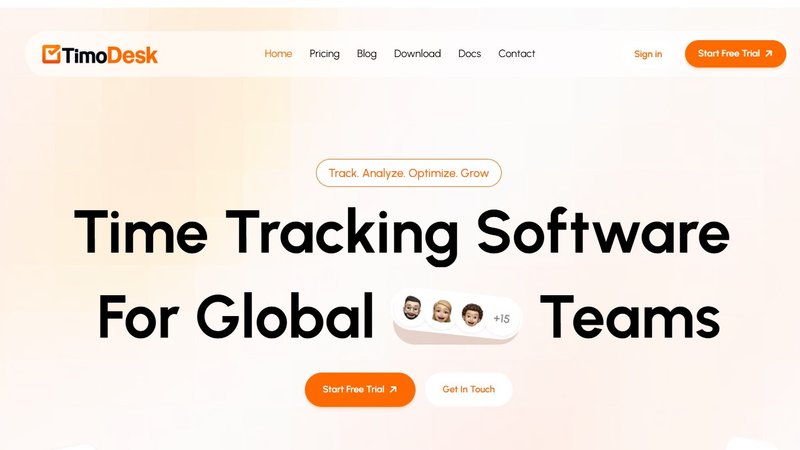
Timo Desk is a powerful, automated time tracking and productivity monitoring software designed for global teams, agencies, offices, and businesses of all sizes. Its core mission is to transform daily work chaos into measurable clarity by eliminating the need for manual time entry. The software automatically records work hours, app usage, and activity levels in real time, running quietly in the background to ensure complete accuracy without any effort from employees. This automation saves significant administrative time and provides managers with crystal clear visibility into daily work activities, project progress, and team focus.
Timo Desk is built for remote teams, project based teams, in house teams, freelancers, and consultants. It serves as an all in one productivity suite where users can track time, manage projects, analyze detailed reports, monitor employee activity, and stay connected from a single workspace. The platform includes smart time tracking, visual productivity reports, activity analysis, and secure screenshot monitoring. By providing precise, activity backed reports and real time insights, Timo Desk helps businesses identify performance trends, improve workflow efficiency, maintain transparency, and foster accountability across the entire team. From startups to large IT companies, any organization that values clear and transparent tracking will find Timo Desk an essential tool for optimizing growth and ensuring every moment counts.
Features of Timo Desk
Smart Time Tracking
Timo Desk eliminates manual time logging by automatically tracking active work hours in real time. The desktop app runs quietly in the background, recording every second spent on tasks and projects without any user input. This feature ensures absolute accuracy in time logs, saves employees from tedious administrative work, and gives managers a precise, unfiltered view of where team time is actually going. Users can easily organize tracked time by specific tasks and projects, making it simple to understand effort distribution across the entire workflow.
Productivity Report
Timo Desk transforms raw tracking data into visual, data driven reports that provide instant clarity on team performance. These reports can be generated for daily, weekly, or monthly periods, offering a clear overview of productivity trends and patterns. Managers can use these insights to identify high performing periods, spot potential bottlenecks, and make smarter decisions to increase overall efficiency. The reports are designed to be intuitive and actionable, helping teams move from confusion to focused results with measurable data that speaks for itself.
Activity Analysis
This feature provides a deep dive into how your team spends time during working hours. Timo Desk automatically monitors app usage, distinguishing between active and idle time to give a complete picture of the workday. It tracks which applications and websites are used most frequently, allowing managers to understand focus levels and identify potential distractions. This granular activity analysis helps teams optimize their daily routines, improve time management, and ensure that effort is being directed toward the most important tasks for better growth.
Screenshot Monitor
Timo Desk offers a secure screenshot monitoring feature that provides visual proof of work progress. Screenshots are captured automatically at random intervals and stored securely in the cloud for later reference. This feature is not about invasive surveillance but about maintaining transparency and accountability, especially for remote and distributed teams. Managers can review visual progress to verify work completion, resolve disputes about time logs, and ensure project milestones are being met. All screenshots are stored with full security to protect sensitive company data.
Use Cases of Timo Desk
Remote Teams
For distributed teams working across different time zones, Timo Desk is an essential tool for maintaining visibility and trust. It automatically tracks hours in real time, so managers no longer need to wonder where their team's time goes. Remote employees benefit from not having to manually log their hours, eliminating a common pain point. The activity reports and screenshot monitoring provide clear evidence of work completed, fostering a culture of transparency and accountability. This allows remote teams to focus on delivering results rather than worrying about proving their productivity.
Project Based Teams
Agencies and project focused teams can use Timo Desk to manage deadlines and monitor progress with precision. The platform allows managers to assign specific tasks and projects, then track exactly how much time each team member spends on them. This real time visibility into progress helps prevent missed deadlines and scope creep. Detailed reports show which projects are consuming the most resources, enabling better budgeting and client billing. With Timo Desk, project based teams can move from uncertainty about progress to a clear, organized dashboard that keeps everyone aligned and on schedule.
In House Teams
Even teams working under one roof can benefit from the structured insights provided by Timo Desk. It helps eliminate the confusion of manual time logs and provides a single source of truth for work hours. Managers can use the productivity reports to identify workflow inefficiencies and optimize team schedules. The activity analysis feature helps in house teams understand their own work patterns, encouraging better focus and time management. By turning daily work activities into measurable data, Timo Desk helps office based teams work smarter, not harder, and improve overall operational efficiency.
Freelancers and Consultants
Freelancers and independent consultants can use Timo Desk to monitor their own productivity and provide transparent billing to clients. The automatic tracking ensures every billable minute is captured accurately, eliminating the guesswork from invoicing. The detailed activity reports and screenshots serve as verifiable proof of work, building trust with clients. Freelancers can also use the analytics to analyze their own work habits, identify their most productive periods, and optimize their schedules for better output. Timo Desk helps independent professionals maintain a professional edge and deliver consistent value.
Pricing of Timo Desk
Timo Desk offers a remarkably simple and transparent pricing model to eliminate the hassle of confusing plans and tiers. The service is available for a flat rate of only $1 per user per month. This single plan grants users full access to all of Timo Desk's features, including unlimited time tracking, team activity monitoring, analytics and reports, screenshot storage, a time calendar and worklogs, and productivity and performance insights. There are no hidden fees, no feature restrictions, and no complex tiered systems. This straightforward pricing allows businesses of any size to budget easily and start benefiting from comprehensive productivity tracking immediately, providing unbeatable value from day one.
Frequently Asked Questions
How does Timo Desk track time?
Timo Desk uses a lightweight desktop application that runs quietly in the background while you work. It automatically monitors active time, application usage, and task engagement without requiring any manual input from the user. The software records accurate work logs in real time, capturing exactly when you are active versus idle. This automated process ensures that every second of productive work is accounted for, eliminating the need for employees to remember to start or stop a timer.
Does Timo Desk work offline?
Yes, Timo Desk is designed to handle offline scenarios. The desktop application can continue to track time and activity even when there is no active internet connection. Once the connection is restored, the recorded data is automatically synced to the cloud. This ensures that time logs remain accurate and complete, regardless of network interruptions, making it a reliable tool for teams working in various environments or while traveling.
Is Timo Desk resource hungry? Will it slow down my computer?
No, Timo Desk is built to be lightweight and efficient. The application runs discreetly in the background and is optimized to use minimal system resources. It is designed to not interfere with your computer's performance or slow down your workflow. Users can work on demanding applications without experiencing any lag or slowdown, ensuring that the time tracking tool remains a helpful assistant rather than a hindrance.
What kind of reports does Timo Desk generate?
Timo Desk generates comprehensive and visual reports that provide deep insights into productivity. Users can create daily, weekly, and monthly reports that show tracked hours, project time allocation, activity summaries, and focus metrics. These reports are data driven and presented in an easy to understand format, helping managers and team members identify performance trends, monitor progress, and make informed decisions to improve workflow efficiency.
You may also like:
Online Keyboard Shortcuts
Master every essential keyboard shortcut for Windows, MacOS, and Linux to automate your workflow and eliminate mouse dependency.
Bg Eraser
Bg Eraser instantly removes backgrounds from up to 20 images at once, delivering clean transparent PNGs with no signup and automatic privacy.
Preuve AI
Preuve AI scans 50+ live data sources in 60 seconds to validate your startup idea with real proof and a viability score.
Boost Your Growth
Submit your SaaS to 140+ directories and SaaS submission sites. We handle every listing so you can focus on building your product.