QUVIAI
QUVIAI turns your prompts into photorealistic renders, 3D scenes, videos, and music using AI powered creation tools.
Visit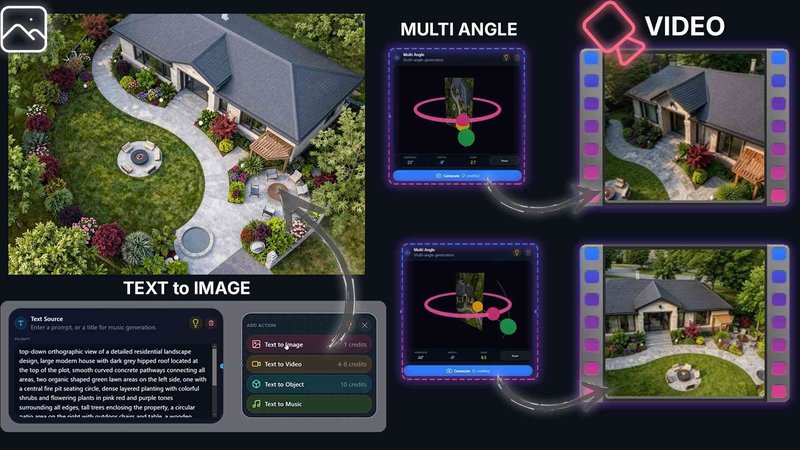
QUVIAI is an all-in-one AI-powered creative platform designed specifically for architects, designers, and creators who need to move from concept to production-ready visuals without switching between multiple tools. The platform eliminates the traditional fragmented workflow by combining image generation, video creation, 3D modeling, rendering, and music production into a single unified workspace. Users can upload a simple sketch, a reference image, or an existing 3D model and transform it into photorealistic renders, cinematic videos, multi-angle views, floor plan renders, and even original music compositions. The core value proposition is efficiency: QUVIAI streamlines the entire creative pipeline, allowing professionals to iterate faster, present more compelling visuals, and reduce the time spent on technical setup. The platform features a built-in 3D workspace where users can model, render, and edit scenes without leaving the application. Text prompts drive scene modifications, furniture and decorative objects can be generated and staged precisely, and cinematic walkthroughs are produced from simple start and end frame inputs. QUVIAI is available across web, iOS, and Android, making it accessible for studio work or on-site presentations. The platform is built by Quick Vision Studios and aims to blend cutting-edge AI with enduring usability, turning creative visions into reality. A free tier with included credits allows new users to test the full suite of tools before committing to a paid plan.
Features of QUVIAI
AI Image Generation
Transform any text prompt or reference image into stunning photorealistic architectural renders in seconds. The image generation suite supports both text-to-image and image-to-image workflows, allowing users to start from scratch or build upon existing concepts. The AI understands architectural language, materials, lighting conditions, and spatial relationships, producing outputs that are ready for client presentations or design reviews. This feature eliminates the need for manual rendering setups and speeds up the conceptual phase dramatically.
AI Video Creation
Animate still images, generate walk-through animations, or create cinematic sequences from a single text prompt. The video generation suite works with both text and image inputs, enabling users to produce dynamic presentations that convey spatial experience and movement. Architects can create flythroughs of unbuilt projects, designers can show how light changes throughout the day, and creators can produce engaging marketing content without hiring video specialists.
Multi Angle Camera Suite
Generate multiple architectural viewpoints from one source image to produce richer, presentation-ready perspective sets. This feature automatically computes alternative camera angles while maintaining consistent lighting, materials, and scene composition. Users can deliver comprehensive visual packages that show a design from every important angle, saving hours of manual camera setup and rendering time.
3D Object Staging
Stage generated 3D objects into scene backgrounds and produce polished compositions with consistent lighting. The object staging suite allows users to generate furniture, decorative items, and architectural elements, then place them precisely within a scene. The AI ensures that lighting and shadows match the background, creating seamless composites that look like they were rendered together. This is ideal for interior designers staging rooms or architects adding context to their projects.
Use Cases of QUVIAI
Architectural Concept Visualization
Architects can upload a hand-drawn sketch or a basic 3D model and instantly generate photorealistic renders that communicate design intent to clients. The AI interprets the spatial layout, applies appropriate materials, and produces presentation-quality visuals in minutes. This accelerates the feedback loop during early design stages and allows architects to explore multiple design directions without committing to expensive manual rendering.
Interior Design Presentation
Interior designers use QUVIAI to generate furnished room scenes from empty floor plans or basic models. The AI can generate furniture and decorative objects, stage them naturally within the space, and produce multi-angle views for client approval. Designers can experiment with different styles, color palettes, and layouts quickly, presenting multiple options in a single session.
Real Estate Marketing
Real estate professionals can transform property photos or architectural plans into cinematic video walkthroughs and polished stills. The platform generates multiple viewpoints, adds realistic lighting, and creates engaging marketing materials that help properties stand out online. Video walkthroughs produced from start and end frames give potential buyers a genuine sense of space and flow.
Product and Furniture Design
Product designers and furniture manufacturers use QUVIAI to visualize new designs in realistic settings. They can generate 3D objects from sketches or descriptions, stage them in appropriate environments, and produce marketing visuals without physical prototypes. The music generation feature adds another layer, allowing designers to create complete branded presentations with original soundtracks.
Pricing of QUVIAI
QUVIAI offers a free tier with included credits so new users can test the platform's full capabilities. For detailed pricing plans, tiers, and subscription costs, visit the Pricing page on the QUVIAI website. Paid plans provide additional credits, higher resolution outputs, and priority processing. Enterprise options are available for studios and teams requiring custom solutions.
Frequently Asked Questions
What file formats can I upload to QUVIAI?
QUVIAI supports image uploads including JPEG and PNG, as well as 3D model files for the built-in 3D workspace. Sketches can be photographed or scanned and uploaded as images. The platform processes these inputs and generates outputs in standard image and video formats suitable for presentation and sharing.
Do I need prior 3D modeling experience to use QUVIAI?
No, QUVIAI is designed for users at all skill levels. The AI handles complex tasks like material assignment, lighting setup, and rendering automatically. Beginners can start with text prompts and image uploads, while experienced users can leverage the 3D workspace for more control. The platform provides a free tier to explore all features.
Can I edit generated images after they are created?
Yes, QUVIAI includes a dedicated Edit suite with masking, inpainting, cleanup, and detail adjustment tools. Users can refine specific areas of an image, remove unwanted elements, or add new objects. This edit workflow is built specifically for architectural and design work, ensuring fast and precise modifications.
Is there a mobile version of QUVIAI?
Yes, QUVIAI is available on web, iOS, and Android. The mobile apps provide access to the full suite of tools, allowing users to generate renders, create videos, and edit scenes from anywhere. This is particularly useful for on-site presentations, client meetings, or quick concept exploration while away from the studio.
You may also like:

Vibeworker
Vibeworker scores every new Upwork job against your profile in real time, so you stop scrolling and only get the best matches.
Goliath Data Real Estate CRM
Goliath Data Real Estate CRM uses AI to identify prospects, automate outreach, and streamline closings for agents and investors.

Boost Your Growth
Submit your SaaS to 140+ directories and SaaS submission sites. We handle every listing so you can focus on building your product.