Here’s a familiar way to lose a month. The team spends a sprint polishing meta descriptions and feels productive. Meanwhile the pricing page has been noindexed since the last redesign, and the integration pages render as empty shells. Nobody slacked off. They worked in the wrong order, because their SaaS SEO checklist was a long, flat list with no sense of what blocks what.
So what should be on a SaaS SEO checklist? The items are no secret: app indexing control, canonical URLs, rendering, product pages, content with real product evidence, links, and measurement that splits branded from non-branded search. What makes a checklist useful is order and a clear done test for each item, not length.
This one is prioritized, technical blockers first and measurement last, and every item ends with a “done when” test anyone can check. It’s built for SaaS teams with a marketing site, a product app, and not enough hours, including the developer who was told in a standup to “own SEO.”
How to use this SaaS SEO checklist
Five tiers, ordered by what blocks what
Each tier depends on the one before it. Content can’t rank if Google can’t render it, and links can’t help pages that don’t exist yet. Work the tiers in order, but don’t wait for perfection. Once a tier’s critical items pass, start the next.
| Tier | What it covers | Work on it when | Typical owner |
|---|---|---|---|
| 1. Technical foundations | Crawling, indexing, rendering, speed | First, and again after every redesign or migration | Developer |
| 2. Site architecture | Page types, URLs, hubs, internal links | Before you scale content | Founder plus developer |
| 3. Content | Keyword-to-page map, product-led pages | Once key templates are indexable | Marketer with product |
| 4. Links and off-site | Profiles, partners, directories, mentions | Once there are pages worth linking to | Founder or marketer |
| 5. Measurement | Search Console, conversions, change log | Baseline on day one, review monthly | Whoever owns growth |
What “done” means here
“Submitted the sitemap” is an activity. “The Sitemaps report shows a successful read, and every listed URL is canonical and indexable” is a done state: two people checking it will reach the same verdict. Every done-when line below is written that way.
When to change the order
Pre-launch with a handful of pages? Tiers 1 and 2 might take an afternoon, so spend your time on tiers 3 and 4. If a Product Hunt launch is coming, get the product pages live first so launch-day visitors have somewhere to land.
Already have hundreds of pages and some traffic? Set up the tier 5 baseline first, or you’ll fix a pile of technical issues and never know whether any of it changed a thing.
Tier 1: Technical foundations for a SaaS website
SaaS sites have quirks a brochure site never faces: an app on a subdomain, preview deployments, a JavaScript framework, and docs that live somewhere else. Each is a way for the wrong pages to get indexed or the right ones to vanish.
1. Verify a Domain property in Search Console. A Domain property covers every subdomain and protocol, so www, app, docs, and blog subdomains all report in one place. That’s how you catch app URLs leaking into the index before a prospect does.
Done when: the Domain property is verified through DNS, at least two people on the team have access, and someone actually receives the email alerts.
2. Keep the app out of the index. Login screens, dashboards, settings pages, and shared workspace URLs have no business in search results. Use a noindex rule for pages that crawlers can reach but shouldn’t index. The classic trap: Google’s documentation on blocking indexing warns that a page blocked by robots.txt can’t have its noindex rule seen, so it can still show up in results if other sites link to it. Done when: the Page indexing report shows no app URLs as indexed, and no URL carrying a noindex rule is also blocked in robots.txt.
3. Pick one canonical version of every URL. Decide on HTTPS, www or non-www, and trailing-slash style, then redirect every variant. Parameter versions created by UTM tags, sorting, or filters should declare the clean URL as canonical. Skip this, and one page quietly becomes six. Done when: every variant 301-redirects to the canonical URL in a single hop, and URL Inspection shows that the Google-selected canonical matches your declared canonical on your ten most important pages.
4. Make sure Google sees the rendered content. Many SaaS marketing sites run on JavaScript frameworks. Google’s JavaScript SEO basics describe three phases (crawling, rendering, and indexing), note that not all bots can run JavaScript, and say server-side rendering or pre-rendering “is still a great idea.” Take the hint. Done when: the URL Inspection live test for each main template (home, feature, integration, pricing, blog post) shows the headline, body copy, internal links, and title in the rendered HTML.
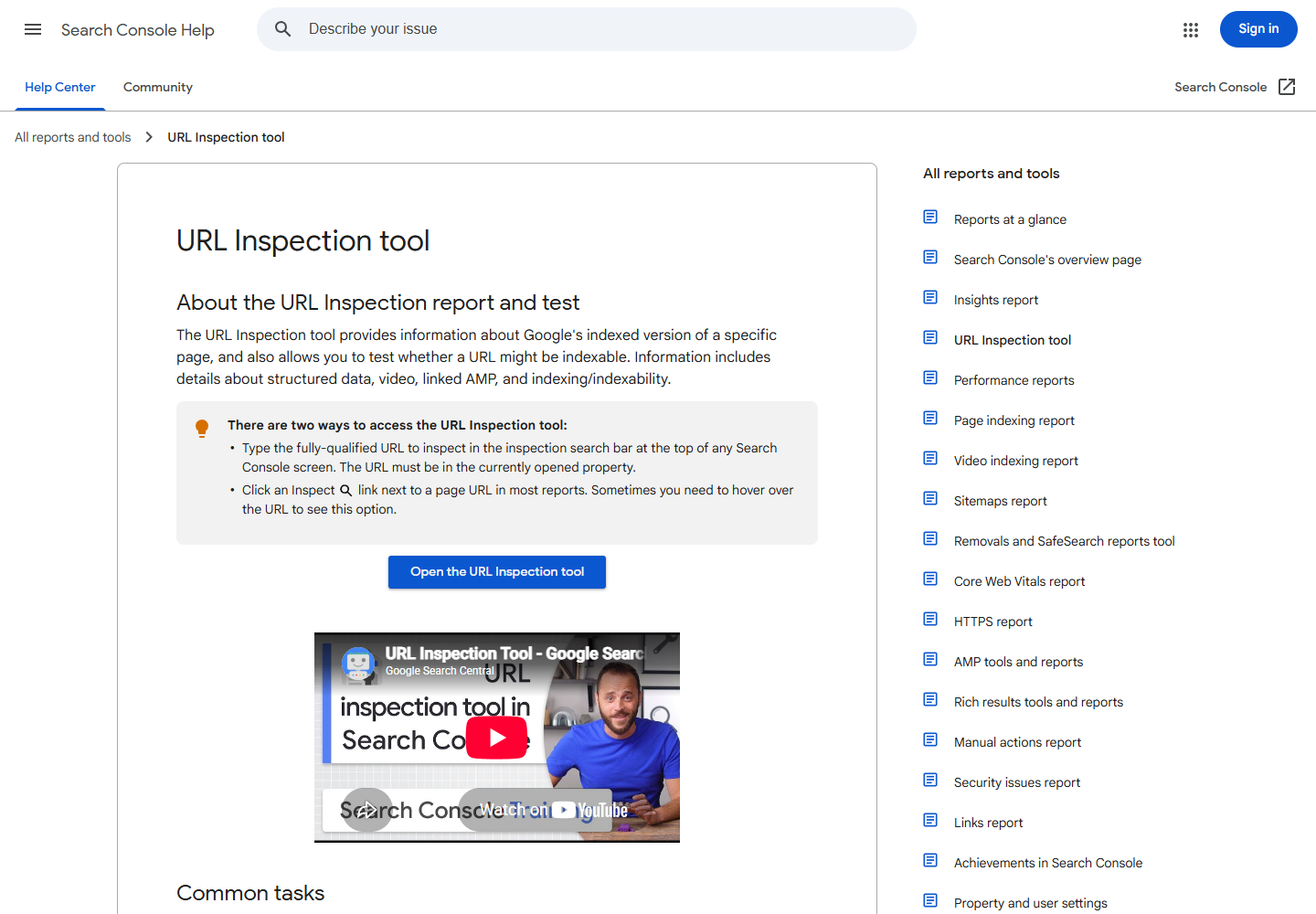
The URL Inspection tool separates Google’s indexed version of a page from a live test, which is how you confirm items 3 and 4. Screenshot captured September 12, 2026 (UTC).
Two cautions from Google’s URL Inspection documentation keep this honest: a passing live test doesn’t guarantee indexing, and “URL is on Google” means the page is eligible to appear, not that it will rank for anything. Green checkmarks are the floor.
5. Return meaningful status codes. Client-side routing often serves a friendly “page not found” message with a 200 status, which Google may treat as a soft 404. Retired features and renamed plans leave dead URLs that other sites still link to. Done when: a made-up URL on your domain returns a real 404 status, retired pages 301 to their closest equivalent, and the Page indexing report shows no unexplained soft 404s.
6. Publish a clean XML sitemap. Google’s sitemap guidelines are refreshingly blunt. Google ignores the priority and changefreq values, uses lastmod only when it’s consistently accurate, and treats a sitemap as a hint rather than a crawl guarantee. Each sitemap file is limited to 50,000 URLs or 50MB uncompressed. Done when: the sitemap lists only absolute, canonical, indexable URLs (no redirects, no noindexed pages), lastmod changes only when content meaningfully changes, and the Sitemaps report shows a successful read.
7. Get key templates into the good Core Web Vitals range. Google’s Core Web Vitals documentation recommends a Largest Contentful Paint within 2.5 seconds, Interaction to Next Paint under 200 milliseconds, and Cumulative Layout Shift below 0.1. The usual SaaS culprits: a chat widget, a stack of analytics tags, an autoplay hero video, and a cookie banner that shoves the page down just as someone reaches for a button. Done when: the Core Web Vitals report shows your main templates as good, or each poor URL group has an open ticket with an owner. Treat this as hygiene; it won’t rescue a page that doesn’t match search intent.
8. Write a unique title and meta description for each page. Yes, the item from the opening. It matters. It just doesn’t matter first. Google builds title links mainly from the title element but can also use headings and other prominent text, and it may rewrite titles that are boilerplate or don’t match the content. Done when: no two indexable pages share a title, each title names the page’s specific subject before the brand name, and the brand appears once.
9. Add structured data only where it’s honest. Organization and WebSite markup help Google understand your brand and site name. SoftwareApplication markup is eligible for rich results only with the required properties: name, offers.price, and either aggregateRating or review, according to Google’s software app structured data guide. Never invent a rating to qualify. Done when: the Rich Results Test passes for each marked-up template, and every rating in your markup matches real reviews visible on the page.
10. Keep staging and preview deployments private. Preview URLs from hosting platforms and staging subdomains get indexed more often than teams expect, usually because someone shared a link publicly. That’s how a half-finished pricing experiment becomes a search result. Done when: staging requires authentication or sends a noindex header, and no staging hostname appears in Search Console data.
Tier 2: Site architecture for features, use cases, integrations, and comparisons
The SaaS page types and the intent behind each
SaaS buyers search in predictable patterns, so you can build for them: one page type per pattern, each answering one question. The example queries below are for a hypothetical invoicing product.
| Page type | The searcher is asking | Example query | Done when the page… |
|---|---|---|---|
| Category or home | What tool does this job? | invoicing software for freelancers | clearly owns the category term |
| Feature | Can it do this specific thing? | recurring invoice software | shows the feature working, limits, and plans |
| Use case or industry | Does it fit my situation? | invoicing for photographers | covers a workflow specific to that audience |
| Integration | Does it work with my stack? | invoicing app stripe integration | explains setup, what syncs, and limitations |
| Comparison | Which option should I pick? | [Competitor] alternatives | uses verified, dated, fair criteria |
| Pricing | What will it cost me? | [Product] pricing | is indexable HTML with current plans |
| Docs and help | How do I do this task? | set up late payment reminders | solves the task and links into the product |
| Templates and tools | Can I get something usable now? | freelance invoice template | works without forcing a signup first |
The architecture checklist
11. Build a hub page for each page family. Features, use cases, integrations, and comparisons each get an index page, such as /features or /integrations. Done when: each hub links to every page in its family, and each child page links back to its hub and to two or three related siblings.
12. Link every page you care about from another page. Google’s guidance on crawlable links says “every page you care about should have a link from at least one other page on your site,” and that Google can reliably crawl only standard HTML anchor elements with an href attribute. Buttons wired up with JavaScript click handlers don’t count, however nice they look. Done when: a site crawl finds no orphan pages among your sitemap URLs, and main navigation and footer links are real anchor links.
13. Use descriptive anchor text. “Learn more” tells neither people nor Google what’s on the other side. It’s a door with no sign on it. Done when: every internal link to a key page uses words that describe that page, such as “recurring invoice settings” rather than “click here.”
14. Keep URLs short, readable, and stable. /integrations/stripe is easier to understand, share, and maintain than /p?id=123, and a rename without a redirect leaves a dead link everywhere the old URL was shared. Done when: URLs are lowercase and hyphenated, and any URL change ships with a 301 redirect in the same release.
15. Assign one page per search intent. Two pages targeting the same query split signals and confuse both Google and the people searching. Done when: your keyword map (item 18) assigns every primary query to exactly one URL.
16. Scale templated pages only when each page has real substance. Integration, industry, and location pages are tempting to generate by the hundred. Google’s spam policies define scaled content abuse as generating many pages primarily to manipulate search rankings, including pages that make little sense to readers but contain search keywords.
So is programmatic SEO safe for SaaS integration pages? It can be, if every generated page is genuinely useful on its own. Judge the page, not the template. An integration page with real setup steps, a list of what syncs, screenshots, and limitations is useful even if it shares a template with fifty others. One that only swaps the partner’s name into identical text isn’t. No substance yet? Don’t publish yet. Done when: each templated page has content specific to its subject (setup steps, what data syncs, screenshots, real limitations), and pages that don’t are unpublished or noindexed until they do.
17. Decide deliberately where docs and the blog live. Subdomain or subfolder can eat a whole meeting. Google’s SEO Starter Guide lists subdomains versus subdirectories among the things you shouldn’t focus on and says to choose based on your business needs. The real risks are duller: docs blocked from indexing by accident, docs and marketing pages that never link to each other, and docs missing from your Search Console property. Pick the setup your team can maintain. Done when: docs are indexable unless intentionally private, linked from relevant marketing pages, and covered by your Search Console Domain property.
Worked example: the first 15 pages for a hypothetical invoicing SaaS
Say you run a hypothetical invoicing tool for freelancers and small agencies, with a Stripe integration, a handful of customers, one developer, and a few hours a week for SEO. Here’s a sensible build order:
- Home, owning “invoicing software for freelancers.”
- Pricing, as indexable HTML rather than an image or an app-only modal.
- Feature: recurring invoices, with screenshots from a demo account.
- Feature: automatic late payment reminders, including what the reminder emails actually say.
- Feature: multi-currency invoicing, with the supported currencies and how exchange rates are handled.
- Use case: photographers, covering deposits, usage licensing line items, and shoot packages.
- Use case: design agencies, covering retainers and milestone billing.
- Integration: Stripe, with setup steps and what syncs in each direction.
- Integration hub, listing live integrations only.
- Comparison: [Competitor] alternatives, with dated, verified feature comparisons.
- Comparison: [Product] vs [Competitor], for the competitor most prospects mention on sales calls.
- Free invoice template, downloadable without signup, which gives other sites a reason to link.
- Guide: how to write an invoice as a freelancer, linking to the template and the home page.
- Guide: payment terms explained, linking to the reminders feature.
- Guide: how to follow up on a late payment, linking to the reminders feature and the template.
Pages 1 to 11 serve buyers who already want a tool. Pages 12 to 15 reach people earlier in the journey and give the site something worth linking to. Notice what’s missing: no think piece on “the future of fintech.” It can wait until the pages that make money exist.
Tier 3: Content that matches SaaS buying intent
Plan before you write
18. Build a keyword-to-page map. One spreadsheet with columns for query cluster, search intent, page type, target URL, status, and last reviewed date. Group close variants (“invoice software for freelancers” and “freelancer invoicing app”) into one cluster. Dull, yes, but it stops two people from writing pages for the same query. Done when: every existing and planned page has exactly one row and one primary cluster, and no cluster points at two URLs.
19. Ship bottom-of-funnel pages before top-of-funnel posts. Should a SaaS startup start with blog content or product pages? Product pages, nearly always. Feature, use-case, integration, comparison, and pricing pages answer people already looking for a tool, so they sit closer to revenue and usually face more specific competition. Broad blog posts mostly bring visitors who aren’t shopping yet. Blog-first can work for a product creating a new category with no existing search demand, but most SaaS products compete in categories people already search for. When the guides arrive, link each one back to the product page it supports. Done when: every core buyer question from the page-types table has a live, indexable page before you publish general industry content.
Make pages only your team could write
20. Put product evidence on every page. Google’s helpful content guidance suggests evaluating content by who created it, how, and why, and calls “why” perhaps the most important question. For a SaaS company, the strongest answer to “how” is first-hand product experience. Done when: each page includes at least one element a competitor couldn’t copy without your product, such as real screenshots, exact setup steps, anonymized data, or an honest limitation.
Rule of thumb: a page only your team could have written is the most durable advantage a small SaaS has in search. Anyone can publish generic advice. Nobody else can publish your product’s real workflow.
21. Keep comparison pages fair and dated. Competitor pricing and features change often, and a prospect who uses the rival product will spot a stale claim. Outdated claims damage trust faster than they help rankings. Done when: every competitor claim has been checked against that competitor’s current public page on a recorded date, and the page shows when it was last reviewed.
22. Show who wrote and reviewed the page. Name the author and, for technical or financial topics, the person who checked the claims. Done when: each guide and comparison page has a visible author, and product or domain experts have reviewed the technical claims.
23. Refresh content without faking freshness. Google’s helpful content guidance specifically asks whether you’re changing page dates to make them seem fresh when the content hasn’t substantially changed. Google has thought about that trick and named it. Done when: a quarterly review list covers your top pages, and visible “updated” dates change only after substantive edits.
24. Let the query set the length. The same guidance asks whether you’re writing to a particular word count because you’ve heard Google prefers one. Google’s SEO Starter Guide says length alone doesn’t matter for ranking. A short answer to a short question is a finished page. Done when: page length is decided by what a visitor needs to complete the task, and briefs don’t contain arbitrary word-count targets.
Tier 4: Links and off-site presence
This is where young sites get impatient and ask how many backlinks a new SaaS website needs. There’s no target number. You need enough relevant links to compete for your queries, and that depends entirely on who already ranks there.
So benchmark instead of guessing. Check the referring domains of comparable sites in the top results, using one tool consistently, and close the gap with integration partners, moderated SaaS directories, founder-led mentions, and linkable assets. A handful of relevant links usually does more than a large batch from sites your buyers never visit.
Build the basic footprint
25. Claim your core profiles. Software review platforms such as G2 and Capterra, plus Crunchbase, LinkedIn, and GitHub if you have public code. These are where people check whether you’re real. Review platforms have their own verification and listing rules, and those change, so read each platform’s current vendor guidelines before you apply. Done when: each profile is live with the same product name, one-line description, URL, and pricing model, and someone owns updating them.
26. Get listed by integration partners. If your product integrates with another tool, its app marketplace or partner directory is one of the most relevant places you can appear. Everyone browsing it already uses the tool you plug into. Done when: every live integration has a listing request submitted to that partner, and its status is tracked.
27. Submit to relevant SaaS directories and launch platforms. Directories help a new domain establish a footprint: brand mentions, category pages buyers browse, and a mix of followed and nofollow links. Choose carefully, because Google’s spam policies list low-quality directory or bookmark site links as an example of link spam. A directory with real categories and visible moderation is a listing; a site that accepts anything is a liability. Done when: you have a shortlist vetted for relevance and moderation, and each submission is tracked through four states: submitted, approved and live, indexed, and link observed in your SEO tool.
Build the shortlist from the directory database, vet it with how to choose SaaS directories, and compare it against 21 SaaS directories we checked by hand. For running the whole campaign, see the directory submission walkthrough.
If the form-filling is the bottleneck, SubmitMatic handles it as a done-for-you SaaS directory submission service: 60+, 100+, or 140+ submissions with a 48-hour turnaround, using automation plus human review, with a Google Sheet report and verification screenshots. Approvals stay with each directory, on timelines from instant to weeks or months, so plan your link tracking accordingly.
Earn the links that compound
28. Create at least one linkable asset. Templates, calculators, and benchmarks drawn from anonymized product data give writers something to cite. A stage-by-stage approach to SaaS backlinks covers which asset fits your stage and how to pitch it. Done when: the asset is live, linked from relevant product pages, and you have an outreach list of sites that cover the topic.
29. Make founder-led mentions a habit. Podcasts, guest articles in niche publications, and useful answers in communities where buyers spend time. None of it scales, and that’s fine: it’s one channel where being small works in your favor. Done when: there’s a recurring monthly slot for this work and a log of what was published where.
30. Keep paid placements clean. Google’s spam policies treat buying links that pass ranking credit as link spam; paid placements should carry rel=“sponsored” or rel=“nofollow.” Done when: every paid placement, sponsorship, and affiliate link has been checked for the right attribute.
Tier 5: Measurement that tells you what to do next
SEO moves slowly enough that you need instruments, not hunches. How long does SaaS SEO take to show results? There’s no reliable timeline, and anyone who promises one is guessing.
Technical fixes can show up as soon as Google recrawls the affected pages, which Google says typically takes a day or so for an individual indexing request but can take much longer. New pages on a young domain often take months to earn steady rankings, depending on competition, content quality, and links. Leading indicators such as indexed pages and non-branded impressions move first, so watch them before you expect clicks and signups to follow.
Set up the baseline
31. Export a Search Console baseline. Clicks, impressions, CTR, and average position by page and by query for the last three months, plus a longer view to catch seasonality. This is your “before” photo. Done when: a dated baseline sheet exists before you start changing pages.
32. Split branded and non-branded queries. Search Console’s Performance report offers a branded and non-branded query filter, though it isn’t available for sub-properties or sites with few impressions. Branded growth usually reflects marketing and word of mouth. Non-branded growth is the clearer signal that SEO is working, because those people found you without knowing your name. Done when: your monthly report shows non-branded clicks and impressions as their own line.
33. Connect organic landing pages to product outcomes. Traffic that never signs up isn’t the goal. Say one page gets 40 visits and three trials, and another gets 4,000 visits and none. The small page is the one doing the job. Done when: you can answer “which organic landing pages produced trials or demo requests last month” from your analytics without guesswork.
34. Keep a change log. Date, URL, what changed, and why. Without it, nobody can explain a rise or a fall three months later. Done when: every SEO-relevant release, redirect, and content update has an entry.
35. Run a monthly review that ends in decisions. Three questions: what’s indexed that shouldn’t be (or isn’t that should be), which pages gained or lost, and which pages convert. Done when: each review produces no more than three prioritized tasks for the next month, each linked to a checklist item above.
What to read and what to ignore
Each of these numbers can mislead in a specific, predictable way, so read the last column first.
| Metric | Where to find it | What it tells you | Watch out for |
|---|---|---|---|
| Indexed pages | Page indexing report | Whether Google stores the pages you want | App and parameter URLs inflating the count |
| Non-branded impressions | Performance report, filtered | Whether you’re visible for new demand | Irrelevant queries that will never convert |
| Clicks by landing page | Performance report, Pages | Which pages earn visits | Comparing periods of different length |
| Organic trials or demos | Your analytics | Whether SEO produces customers | Attribution gaps from consent banners |
| Referring domains | Ahrefs, Semrush, or Moz | Whether your off-site footprint is growing | Mixing tools, or chasing a score over fit |
SaaS SEO checklist mistakes that undo good work
Most teams don’t fail on knowledge. They fail on order and follow-through:
- Treating the checklist as a one-time project. Redesigns, framework upgrades, and domain changes break tier 1 items without announcing it. Re-run items 1 to 10 after every major release.
- Letting the app into the index. Thousands of thin workspace or profile URLs dilute the site and bury your reports under noise.
- Blog first, product pages later. Broad posts can bring traffic that never converts while your feature and comparison pages don’t exist yet. That’s an audience with nowhere to go.
- Generating hundreds of near-identical pages. Integration or industry pages with only the name swapped invite exactly the scaled-content problem Google describes.
- Chasing a third-party score. DR or DA can rise while the pages you need to rank stay weak. Relevance beats the number.
- Changing ten things at once. Rewrite titles, restructure the menus, and launch new pages in the same week, and you’ll never know which one worked.
- Migrating without a redirect map. Every old URL needs a mapped destination before launch day, not after rankings drop.
Next steps: work the SaaS SEO checklist in order
Start with the first six items done properly and an honest list of what’s missing.
- This week: complete items 1 to 6 and record anything you can’t fix immediately as a ticket with an owner.
- Next two weeks: map your page types against the table in tier 2 and list the missing pages in priority order, the way the invoicing example does.
- This month: ship two or three bottom-of-funnel pages with real product evidence, and add them to your keyword map.
- In parallel: claim your core profiles and start a vetted directory shortlist. The free AI listing generator drafts listing copy from your product URL; adapt it per directory so listings don’t all read the same. Track the four states from item 27 with the sheet in the guide to tracking directory submissions.
- If launch is close: run through the free startup launch checklist to line up launch platforms and assets alongside this SEO work.
- If you want the directory work off your plate: compare the packages on the SubmitMatic pricing page. Each is a one-time fee for a fixed number of submissions (Basic $60 for 60+, Standard $100 for 100+, Premium $140 for 140+, taxes not included), and you own the resulting listings. Approvals and crawling still decide what goes live, so nothing is guaranteed; the founder’s note on why the service exists has the backstory.
- Every month: run the item 35 review, update the change log, and pick no more than three tasks.
A SaaS SEO checklist is only as good as the order you work it in. Fix what blocks crawling, build the pages buyers already search for, and measure before you celebrate.